
Get Ready to Pass the 2V0-11.25 exam with VMware Latest Practice Exam
Get Prepared for Your 2V0-11.25 Exam With Actual VMware Study Guide!
VMware 2V0-11.25 Exam Syllabus Topics:
| Topic | Details |
|---|---|
| Topic 1 |
|
| Topic 2 |
|
| Topic 3 |
|
| Topic 4 |
|
| Topic 5 |
|
NEW QUESTION # 18
A cloud administrator recently deployed a new VI workload domain. As part of the initial VI domain creation, the administrator created a new SSO domain. However, they reconsidered and now want the domain to use the same SSO domain as the management domain.
How can the VI domain be changed from a dedicated SSO domain to sharing the SSO domain with the management domain?
- A. From the Management Domain vCenter Server instance, use the rsautil command to add the VI workload domain to the management domain SSO ring.
- B. From the VI Workload Domain vCenter Server instance, use the rsautil command to join the management domain SSO ring.
- C. The vSphere SSO domain cannot be changed once it has been deployed and a new VI workload domain that is part of the Management SSO domain must be created, and workloads migrated.
- D. From the SDDC Manager console, use the rsautil command to add the VI workload domain to the management domain SSO ring.
Answer: C
Explanation:
Once the vSphere Single Sign-On (SSO) domain is set up for a workload domain, it cannot be changed. If you need the VI workload domain to use the same SSO domain as the management domain, you must create a new VI workload domain that is part of the management domain's SSO ring, and then migrate the workloads to the new domain.
NEW QUESTION # 19
Following an update to the Information Security policy, an administrator has been reviewing the status SSL certificates within the VMware Cloud Foundation (VCF) solution.
The new Information Security Policy states:
All SSL certificates must be generated and signed from the shared Microsoft Certificate Authority (CA).
The administrator has discovered the following:
All Aria Suite Components already use CA-signed Subject Alternate Name (SAN) SSL certificates.
All other VCF-based SSL certificates are either self-signed or generated using the VMware Certificate Authority (VMCA).Which three steps must the administrator take to ensure the VCF solution remains compliant and managed by SDDC Manager? (Choose three.)
- A. In VMware vCenter, replace the ESXi SSL certificates.
- B. Integrate the Microsoft CA into SDDC Manager.
- C. In SDDC Manager, replace the SSL certificates for vCenter, NSX Manager, SDDC Manager and Aria Suite Lifecycle.
- D. In SDDC Manager, replace the SSL certificates for vCenter, ESXi, NSX Manager, SDDC Manager and Aria Suite Lifecycle.
- E. Integrate the OpenSSL CA into SDDC Manager.
- F. In Aria Suite Lifecycle, replace the VMware Identity Manager, Aria Automation, Aria Operations and Aria Operations for Logs SSL certificates.
Answer: B,C,D
Explanation:
As per theVMware Cloud Foundation Administration Guide, the official and supported process for moving all solution certificates under a Microsoft Certificate Authority, while keeping management and lifecycle operations compliant with SDDC Manager, is as follows:
C). Integrate the Microsoft CA into SDDC Manager.Exact Extract:
"To replace SSL certificates for VMware Cloud Foundation components using SDDC Manager, you must first integrate your Microsoft CA with SDDC Manager. This allows SDDC Manager to automate the certificate signing process using the organization's enterprise CA." F). In SDDC Manager, replace the SSL certificates for vCenter, ESXi, NSX Manager, SDDC Manager and Aria Suite Lifecycle.Exact Extract:
"With Microsoft CA integration, you can use SDDC Manager to generate and replace SSL certificates for all key solution components, including vCenter, ESXi, NSX Manager, SDDC Manager, and Aria Suite Lifecycle.
This process ensures full visibility and management through SDDC Manager." D). In SDDC Manager, replace the SSL certificates for vCenter, NSX Manager, SDDC Manager and Aria Suite Lifecycle.Exact Extract:
"Certificate replacement workflows in SDDC Manager allow you to select which managed components have their certificates replaced with CA-signed certificates. You must select and update all components that are not already using compliant CA-signed certificates." Why Not the Other Options?
A:ESXi certificate replacement should be managed via SDDC Manager for compliance, not directly in vCenter.
B:OpenSSL CA is not part of the company's security policy or supported by the current workflow.
E:Aria Suite Lifecycle and its components already use CA-signed certificates, so this action is not needed.
Summary:
To ensure compliance with the updated security policy and maintain management with SDDC Manager, the administrator must:
Integrate the Microsoft CA into SDDC Manager (C),
Use SDDC Manager to replace all relevant solution SSL certificates for vCenter, ESXi, NSX Manager, SDDC Manager, and Aria Suite Lifecycle (F), And use SDDC Manager's certificate replacement workflow to update any components still requiring CA- signed certificates (D).These steps are mandated and supported by VMware Cloud Foundation official documentation.
NEW QUESTION # 20
While deploying the first VI workload domain in a VMware Cloud Foundation solution, which two steps will always be performed by SDDC Manager? (Choose two.)
- A. Connect a newvCenter Server instance to the Application Virtual Network.
- B. Confiqure vSAN for the VI workload domain's storaqe needs.
- C. Deploy a new NSX Manaqer instance for the VI workload domain.
- D. Deploy an NSX Edqe cluster and confiqure BGP routinq on the TO Gateway.
- E. Deploy and confiqure a newvCenter Server instance for the VI workload domain.
Answer: C,E
Explanation:
SDDC Manager automatically deploys and configures a new vCenter Server instance as part of the deployment of the VI workload domain.
SDDC Manager also handles the deployment of a new NSX Manager instance to provide network virtualization services for the VI workload domain.
NEW QUESTION # 21
An administrator is troubleshooting a high CPU usage issue of the SDDC Manager VM. Access to SDDC Manager UI is exhibiting degraded performance.
What two steps should the administrator take to diagnose the issue? (Choose two.)
- A. Upgrade the vSphere version to the latest release.
- B. Login to SDDC Manager using console with root credentials, run the top command to identify any services that may be consuming high %CPU.
- C. Reboot the SDDC Manager VM to clear any temporary issues.
- D. Review the CPU usage of the ESXi management domain hosts to identify any that are overcommitted.
- E. Reconfigure the DRS settings to be more aggressive in load balancing.
Answer: B,D
Explanation:
Comprehensive and Detailed Explanation From Exact Extract:
When troubleshooting high CPU usage on the SDDC Manager VM, the recommended diagnostic steps are:
Login to SDDC Manager using console with root credentials, run the top command to identify any services that may be consuming high %CPU (B): The official documentation instructs administrators to use system monitoring commands such as top or htop within the SDDC Manager appliance to determine if specific processes or services are causing elevated CPU usage. This helps pinpoint the root cause inside the VM.
Review the CPU usage of the ESXi management domain hosts to identify any that are overcommitted (D): High CPU usage within the SDDC Manager VM could also result from overall CPU contention on the physical ESXi hosts. Checking host-level CPU usage can help determine if the underlying infrastructure is contributing to the performance issue. The documentation emphasizes reviewing host resource metrics to ensure the management cluster is not overcommitted.
Other options such as rebooting the VM, upgrading vSphere, or modifying DRS settings are not recommended as initial diagnostic steps according to official guidance. Rebooting or changing configurations without proper analysis may disrupt services or not address the root cause.
NEW QUESTION # 22
A host in a vSphere environment needs to be taken offline for hardware maintenance. An administrator needs to put the host in maintenance mode without causing VM downtime.
What three steps should the administrator follow? (Choose three.)
- A. Select the "Fractional data migration" option
- B. Migrate all VMs off the host using vMotion
- C. Select the host and enter maintenance mode from the vSphere Client
- D. Verify that no VMs are running on the host before maintenance
- E. Ensure that the host is not part of a vSphere HA cluster
Answer: B,C,E
Explanation:
Using vMotion to migrate all virtual machines off the host ensures that there is no downtime for the VMs during the maintenance process.
The administrator should then select the host and initiate maintenance mode from the vSphere Client to begin the maintenance process.
Ensuring the host is not part of a vSphere HA cluster before maintenance is important to avoid triggering unnecessary VM restarts or failovers during the process.
NEW QUESTION # 23
An administrator needs to scale an NSX Edge cluster by adding additional Edge nodes.
Which three steps must be taken before scaling an Edge cluster from SDDC Manager? (Choose three.)
- A. Add an additional NSX VDS uplink for each Edge node being added.
- B. Place the Edge cluster in maintenance mode prior to expanding.
- C. Assign two Tunnel Endpoint (TEP) addresses for each Edge node.
- D. Assign a unique management IP for each Edge node.
- E. Verify DNS records have been added for each new Edge node.
Answer: C,D,E
Explanation:
When scaling an NSX Edge cluster in VMware Cloud Foundation using SDDC Manager, the following preparatory steps are explicitly required as per the official documentation:
Assign a unique management IP for each Edge node (A):Each new Edge node must have its own unique management IP address for proper identification and network communication.
Assign two Tunnel Endpoint (TEP) addresses for each Edge node (B):Two TEP addresses are needed for overlay network connectivity to ensure redundancy and optimal traffic flow.
Verify DNS records have been added for each new Edge node (D):Proper DNS records must exist for management and operational connectivity, as DNS resolution is critical for Edge node communication and cluster integration.Adding uplinks or placing the Edge cluster in maintenance mode are not prerequisites for adding new Edge nodes, according to the preparation requirements detailed in VMware documentation.
NEW QUESTION # 24
An IT team needs to ensure compliance and security for various database workloads managed by Data Services Manager.
Which three features of Data Services Manager should be leveraged to achieve this? (Choose three.)
- A. vSphere DRS for resource scheduling.
- B. Integration with NSX for network security policies.
- C. Encryption of data at rest and in transit.
- D. Role-based access control (RBAC) to restrict database access.
- E. Automated patch management for database instances.
Answer: C,D,E
Explanation:
Automated patch management ensures that database instances are kept up-to-date with the latest patches, which is essential for maintaining compliance and security.
Encryption of data at rest and in transit helps protect sensitive database data from unauthorized access and tampering, ensuring compliance with security standards.
Role-based access control (RBAC) restricts database access based on user roles, ensuring that only authorized users have access to sensitive data, which is crucial for compliance and security.
NEW QUESTION # 25
An administrator needs to ensure that specific virtual machines within a VMware Cloud Foundation environment use storage that can tolerate at least two host failures. As resources are limited, the configuration should use the available resources as efficiently as possible.
Which three steps should be performed to configure a storage policy that meets the requirements? (Choose three.)
- A. Set Failures to Tolerate to "2 failures - RAID-1 (Mirroring)" in the policy configuration.
- B. Set Failures to Tolerate to "2 failures - RAID-6 (Erasure Coding)" in the policy configuration.
- C. Configure the policy to use thin provisioning.
- D. Apply the storage policy to the target VMs.
- E. Reconfigure the existing Default Storage Policy in the vSphere Client.
- F. Create a new VM Storage Policy in the vSphere Client.
Answer: B,D,F
Explanation:
A new VM storage policy needs to be created in the vSphere Client to define specific requirements for the storage configuration, including tolerance for two host failures.
Once the storage policy is created, it must be applied to the specific virtual machines that require the storage configuration that tolerates two host failures.
To ensure the storage configuration tolerates two host failures efficiently, RAID-6 (Erasure Coding) is the appropriate choice. RAID-6 can tolerate two host failures while minimizing resource usage compared to other configurations like RAID-1.
NEW QUESTION # 26
What is the impact of consolidating snapshots on a virtual machine?
- A. It temporarily increases the available disk space consumption on the datastore while merging data.
- B. It reverts the VM to the state of the first snapshot taken.
- C. It changes the VM's hardware compatibility settings.
- D. It disconnects the VM from the network temporarily.
Answer: A
Explanation:
When consolidating snapshots, the data from the snapshot files is merged back into the original virtual disk. This process temporarily increases the disk space usage on the datastore because of the additional space required to merge the snapshot data into the primary disk.
NEW QUESTION # 27
What is a symptom of an issue with vSphere HA?
- A. Hosts frequently disconnect from vCenter Server.
- B. Snapshots cannot be created or consolidated.
- C. VMs are not being migrated using vMotion.
- D. VMs are not restarted after a host failure.
Answer: D
NEW QUESTION # 28
An alert in SDDC Manager indicates that the health status of the vSAN cluster is degraded.
Which tool within VMware Cloud Foundation should be used to gather detailed logs and perform in-depth troubleshooting for the vSAN issues?
- A. SDDC Manager
- B. vCenter Server
- C. Aria Operations for Networks
- D. Aria Operations for Logs
Answer: D
Explanation:
Aria Operations for Logs (formerly known as vRealize Log Insight) is used to collect, analyze, and troubleshoot logs from various components within VMware Cloud Foundation, including the vSAN cluster. It provides detailed insights into the logs, allowing administrators to perform in-depth troubleshooting of issues like degraded health statuses.
NEW QUESTION # 29
An administrator has deployed a new VMware Cloud Builder appliance using the downloaded OVF file. While attempting to use the VMware Cloud Builder interface, the administrator discovers that no connection can be established to the appliance.
Which three configuration errors may have occurred? (Choose three.)
- A. Incorrect Static IP configuration.
- B. Incorrect NTP settings or inaccessible NTP servers.
- C. BGP routing misconfiguration.
- D. Incorrect Dynamic IP configuration.
- E. VLAN misconfiguration.
- F. Incorrect DNS settings or inaccessible DNS servers.
Answer: A,E,F
Explanation:
A VLAN misconfiguration could prevent proper network connectivity, particularly if the appliance is not in the correct VLAN or if there is a misalignment in network segmentation.
Incorrect DNS settings or inaccessible DNS servers can prevent the VMware Cloud Builder appliance from being able to resolve hostnames, leading to connection issues.
Incorrect Static IP configuration would result in the appliance being unreachable because it won't have the correct IP address or network configuration to communicate with other components.
NEW QUESTION # 30
Which three tasks are performed by Cloud Builder during the bring-up process of a VMware Cloud Foundation solution? (Choose three.)
- A. SDDC manager deployment
- B. vVols storage configuration for all management hosts
- C. vCenter and NSX Manager cluster deployment
- D. Aria Suite Lifecycle Manager deployment
- E. NSX Edge cluster deployment
- F. vSphere HA/DRS cluster creation and configuration
Answer: A,C,E
Explanation:
Cloud Builder deploys the SDDC Manager, which is responsible for managing and automating the VMware Cloud Foundation environment.
Cloud Builder deploys the NSX Edge cluster as part of the network configuration during the bring-up process.
Cloud Builder also deploys the vCenter and NSX Manager clusters to ensure proper management and network virtualization for the VMware Cloud Foundation environment.
NEW QUESTION # 31
How do virtual machine (VM) storage policies in a VMware vSphere environment contribute to optimizing resource utilization, ensuring data availability, and meeting application-specific requirements?
- A. By guaranteeing storage IOPs for a particular virtual machine
- B. By regulating and optimizing storage traffic between virtual machines
- C. By streamlining the process of automating virtual machine backups
- D. By defining and enforcing storage requirements, such as performance, availability, and redundancy
Answer: D
Explanation:
VM storage policies let you specify requirements like performance tiers, redundancy levels, and availability SLA, and vSphere enforces these rules against underlying storage capability profiles to optimize resource usage and meet application needs.
NEW QUESTION # 32
Which two SDDC Manager operations can be executed on an NSX Edge cluster after it has been deployed?
(Choose two.)
- A. Delete
- B. Redeploy
- C. Shrink
- D. |Sync
- E. Expand
Answer: A,D
Explanation:
After an NSX Edge cluster has been deployed, you can perform a sync operation to ensure the NSX Edge cluster is in sync with the configuration in SDDC Manager.
Deleting an NSX Edge cluster can be done after it has been deployed if it is no longer required or needs to be removed from the environment.
NEW QUESTION # 33
An administrator can set resource limits and container defaults on a vSphere Namespace.
Which three resource limits can be set? (Choose three.)
- A. Memory
- B. Storage
- C. Number of containers
- D. Network
- E. CPU
Answer: A,B,E
Explanation:
Within a vSphere Namespace, administrators have the ability to configure resource limits to control the amount of resources that workloads can consume. According to the official VMware Cloud Foundation documentation, the three types of resource limits that can be set on a vSphere Namespace are:
CPU:The administrator can specify the maximum CPU resources that can be used within the namespace.
Memory:The administrator can define the maximum amount of memory allocated to workloads in the namespace.
Storage:The administrator can configure storage limits, specifying how much storage capacity is available to the namespace.
These resource limits are essential for managing and isolating resources across different namespaces to prevent resource contention and ensure fair resource distribution. The documentation clearly states that there is no option to set a resource limit based on the number of containers or network bandwidth within the vSphere Namespace configuration. The focus is solely on controlling CPU, memory, and storage resources.
NEW QUESTION # 34
An organization is using VMware Aria Automation for automating virtual machine deployments. Recently, some deployment requests have been failing. An administrator needs to use Aria Automation to troubleshoot these failures.
Which two steps should be taken? (Choose two.)
- A. Cheek the request logs for error messages.
- B. Review the provisioning diagrams for patterns of failure.
- C. Disable integrations and re-run deployment.
- D. Disable all automation policies temporarily.
- E. Re-run the failed deployments without any changes.
Answer: A,B
Explanation:
Checking the request logs surfaces the specific error messages and failures during provisioning.
Reviewing the provisioning diagrams helps identify patterns or misconfigurations in the automation workflow.
NEW QUESTION # 35
DRAG DROP
Put the following steps in the correct order to update the driver/firmware in vSAN.
Answer:
Explanation:
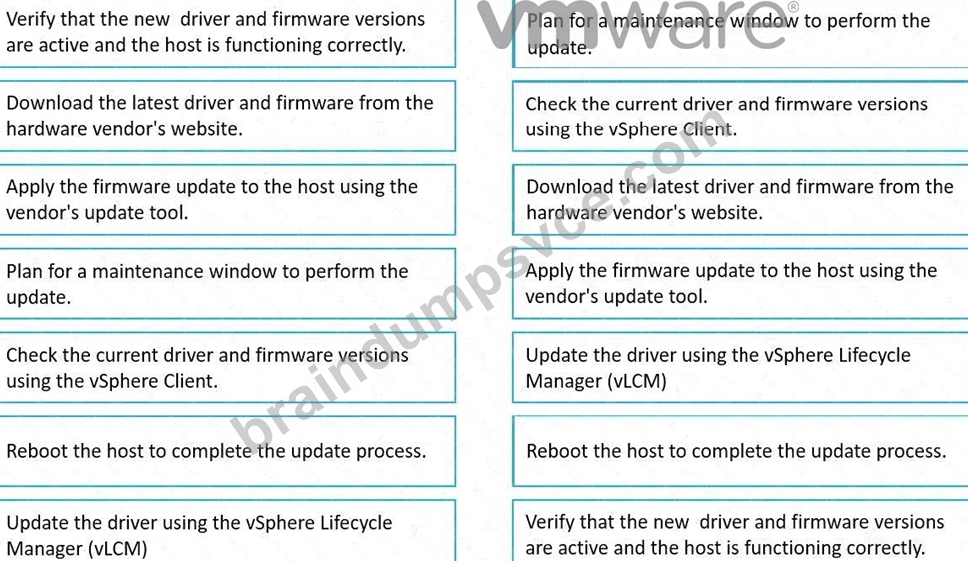
NEW QUESTION # 36
What is the primary benefit of using HCX Replication Assisted vMotion (RAV) for VM migration?
- A. It ensures zero downtime to the VM(s).
- B. It provides the fastest migration method by powering off the VM(s) before initiating the migration.
- C. It performs a test migration to ensure compatibility.
- D. It requires no configuration changes to the VM(s) within the destination environment.
Answer: A
Explanation:
According to theVMware HCX User Guideand theVMware Cloud Foundation 5.2 Documentation,HCX Replication Assisted vMotion (RAV)is designed to provide a seamless migration of VMs across environmentswith no downtimeto the workload.
Exact Extract from the VMware HCX User Guide:
"HCX Replication Assisted vMotion (RAV) provides zero-downtime migration for virtual machines, combining the benefits of vMotion with replication technologies. This allows VMs to continue running without disruption during the migration process, ensuring uninterrupted service for business-critical workloads." (VMware HCX User Guide - VM Mobility Methods) Why Not the Other Options?
A:RAV does not eliminate all configuration changes; network and other settings may still need updates depending on environments.
B:RAV does not perform a test migration; test migration is a feature of other migration methods.
D:RAV is not a cold migration method; it avoids powering off the VMs and maintains their availability throughout.
Summary:
Theprimary benefitof usingHCX Replication Assisted vMotion (RAV)for VM migration is thatit ensures zero downtime to the VM(s) (C), as stated in the official VMware documentation.
NEW QUESTION # 37
An organization is integrating VMware vCenter with Active Directory (AD) to streamline user authentication.
As part of this process, the administrator needs to add AD as an identity source in vCenter.
Which three steps must be performed to successfully add AD as an identity source? (Choose three.)
- A. Select 'Add Identity Source' and choose 'Active Directory (Integrated Windows Authentication)'.
- B. Configure DNS settings on all ESXi hosts to point to the AD DNS servers.
- C. Reboot the vCenter Server to apply the identity source settings.
- D. Navigate to the vCenter Single Sign-On configuration in the vSphere Client.
- E. Enter the Domain Name and the credentials of an AD user with domain join privileges
Answer: A,D,E
Explanation:
When adding AD as an identity source, you need to enter the Domain Name and provide the credentials of an AD user with domain join privileges to authenticate and add the domain.
In the vSphere Client, you need to select 'Add Identity Source' and choose the appropriate method for AD integration, which is typically 'Active Directory (Integrated Windows Authentication)'.
The process to add AD as an identity source is performed under the vCenter Single Sign-On (SSO) configuration in the vSphere Client.
NEW QUESTION # 38
An organization needs to perform maintenance on a specific host in a vSAN cluster. An administrator is required to put the host into maintenance mode whilst ensuring that all VMs in the cluster remain accessible.
Which three steps should the administrator take to correctly set a vSAN host into maintenance mode? (Choose three.)
- A. Right-click the host and select "Enter Maintenance Mode."
- B. Navigate to the vSAN cluster in the vSphere Client and select the host.
- C. Choose the "Ensure Accessibility" option to maintain data accessibility.
- D. Select the "No Data Migration" option to speed up the process.
- E. Migrate all VMs manually from the host before enabling maintenance mode.
Answer: A,B,C
Explanation:
The "Ensure Accessibility" option ensures that all data remains accessible during maintenance while minimizing the impact on performance and data migration.
The administrator must navigate to the vSAN cluster in the vSphere Client to select the host for maintenance mode.
Right-clicking the host and selecting "Enter Maintenance Mode" is the standard action for placing a host into maintenance mode.
NEW QUESTION # 39
An organization is planning to manage a diverse set of databases across multiple VMware Cloud Foundation (VCF) environments using Data Services Manager.
Which three capabilities of Data Services Manager would help the organization managing these databases efficiently? (Choose three.)
- A. Centralized monitoring and alerting for all managed databases
- B. Automated database migration between on-premises and cloud environments
- C. Policy-based backup and recovery for databases
- D. Automated database provisioning and deployment
- E. Integration with vSAN for optimized storage management
Answer: A,C,D
Explanation:
Centralized monitoring and alerting gives visibility into performance and health across all databases.
Policy-based backup and recovery ensures consistent protection and recovery SLAs for each database.
Automated provisioning and deployment accelerates rollout of new database instances with standardized configurations.
https://blogs.vmware.com/cloud-foundation/2024/09/24/the-value-of-data-services-manager-for-modern- workloads/
NEW QUESTION # 40
A company plans to enhance its DevOps practices by implementing Kubernetes as part of a VMware Cloud Foundation (VCF) environment.
Which three steps must an administrator perform to achieve this integration? (Choose three.)
- A. Configure storage policies for Kubernetes cluster namespace consumption.
- B. Enable IaaS control plane on existing vSphere clusters.
- C. Deploy HCX to migrate existing VMs to Kubernetes.
- D. Configure Aria Automation to automate the deployment of Kubernetes clusters.
- E. Deploy NSX to manage the networking for Kubernetes clusters.
Answer: A,B,E
Explanation:
You must enable the IaaS control plane (Workload Management/vSphere Supervisor) on your vSphere clusters via SDDC Manager to provide the Kubernetes control plane.
Defining storage policies ensures that your Kubernetes Namespaces can consume persistent storage that meets application requirements.
NSX must be deployed (and an Edge cluster available) to provide networking, load balancing, and security services for the Kubernetes Pods and control plane.
NEW QUESTION # 41
......
Pass Your Next 2V0-11.25 Certification Exam Easily & Hassle Free: https://www.braindumpsvce.com/2V0-11.25_exam-dumps-torrent.html
Free VMware 2V0-11.25 Exam Question Practice Exams: https://drive.google.com/open?id=1xFhTScu_NsmRXAHuNB7GG3SoUD66_LZx